Work on their desktop
Mouse and keyboard control, file transfer, chat, and on-screen annotations. Connect by PCID, saved computer, or Quick Link.
Set up your first connection Screensie
Screensie is Windows and Linux remote support for IT teams, MSPs, and repair shops.
$10/month for two PCs you connect from. Unlimited customer PCs. No per-endpoint fees. See plans
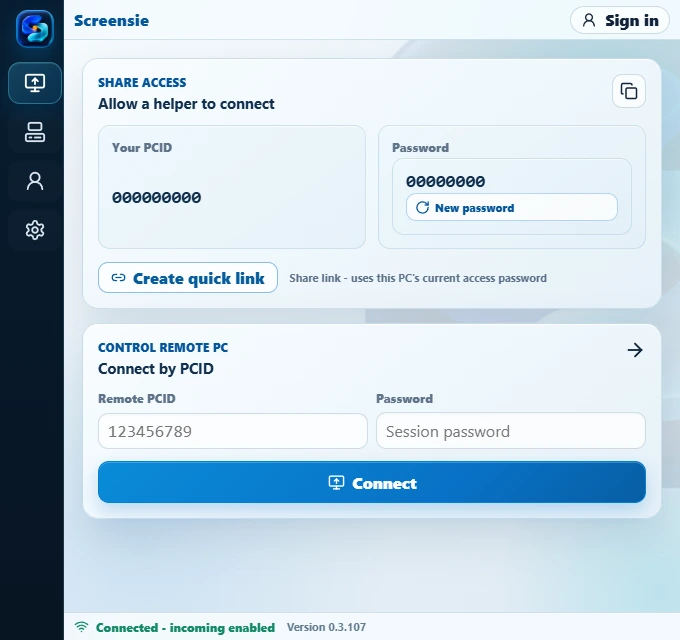
Connect to a desktop, investigate a problem, and keep your computers in view. One connected toolkit.
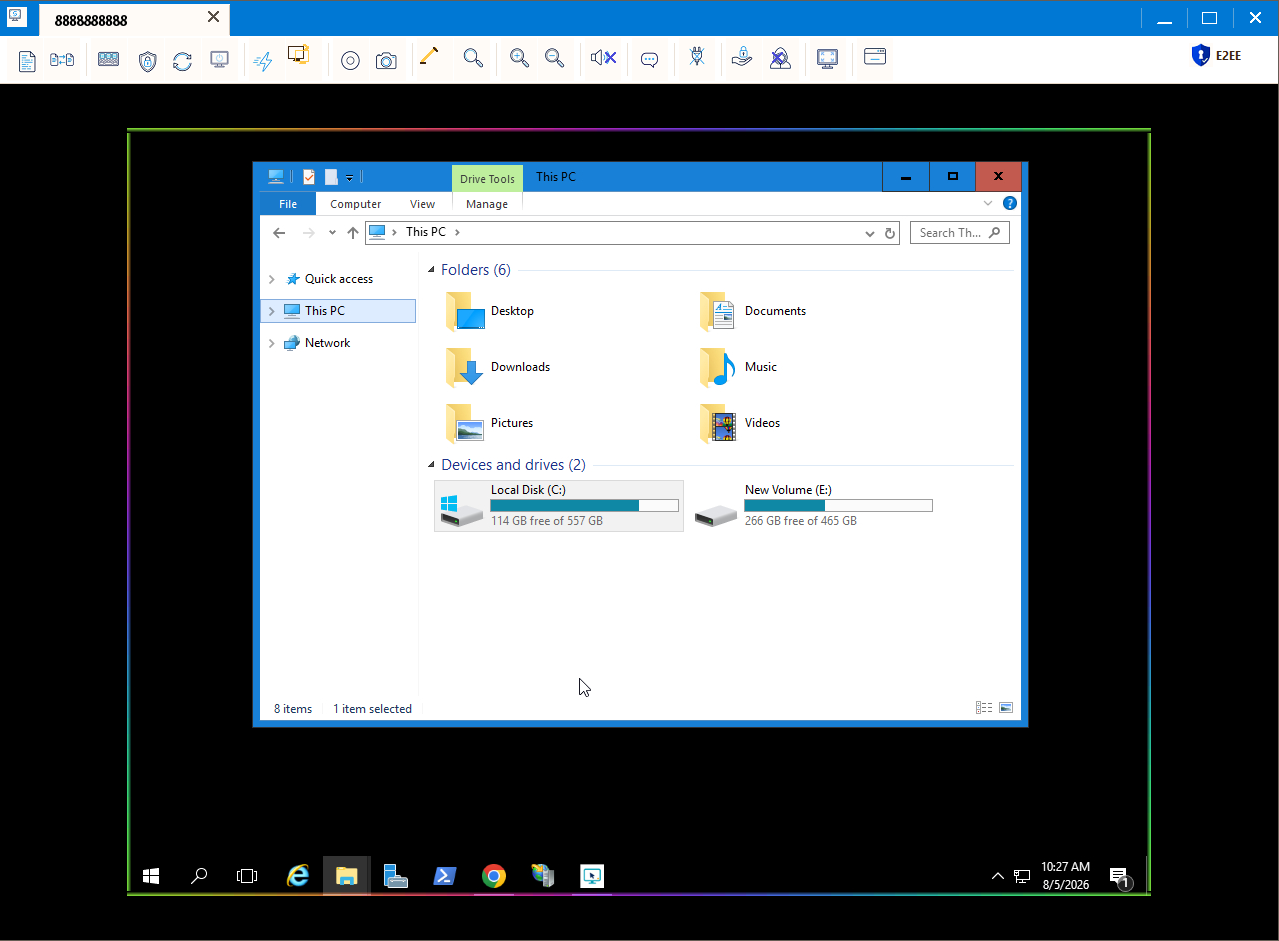
Remote Control, Command Center and Screensie Manager. The animated demonstration uses fictional computers and connection details.
Mouse and keyboard control, file transfer, chat, and on-screen annotations. Connect by PCID, saved computer, or Quick Link.
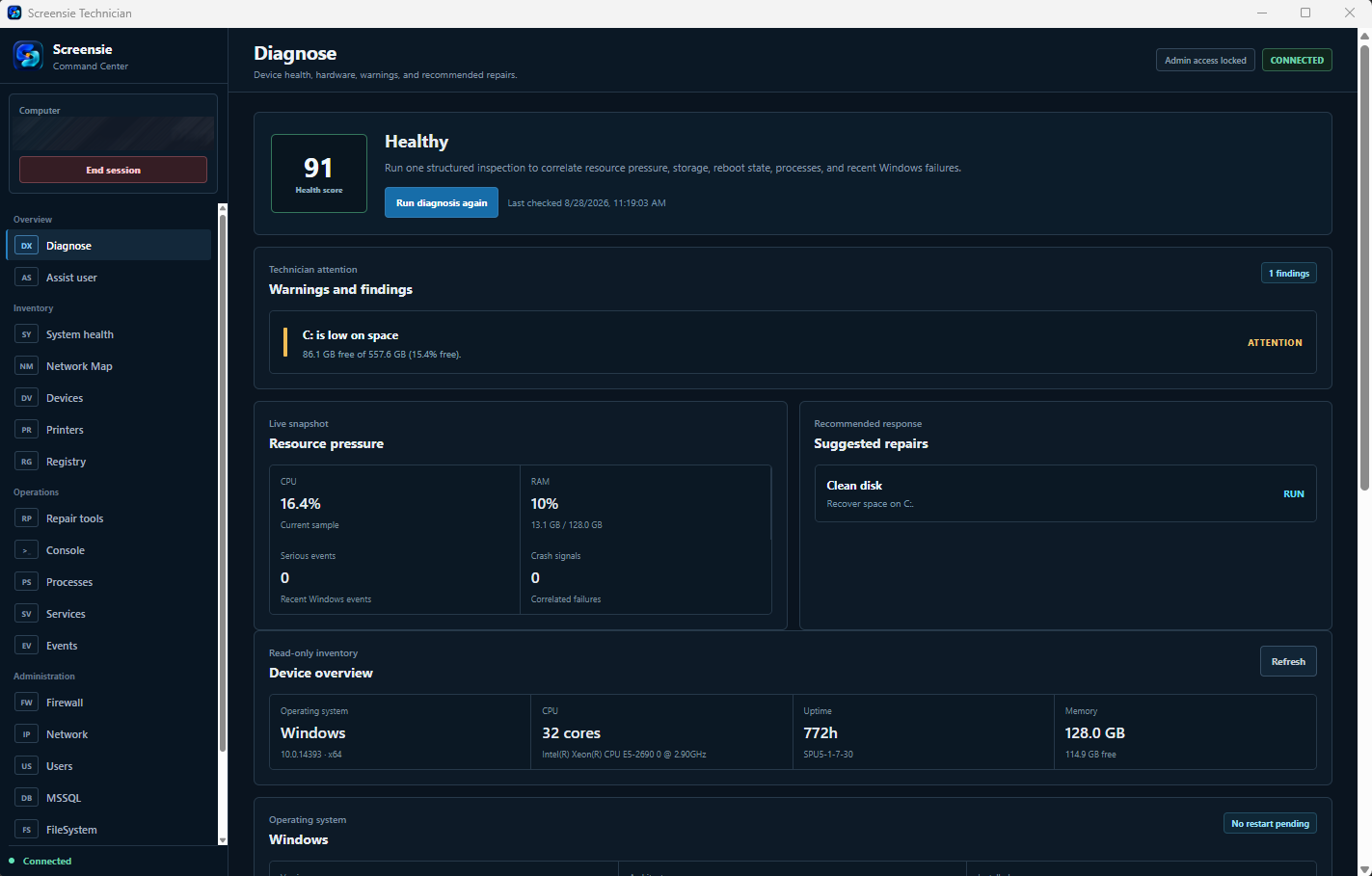
Set up your first connectionHealth findings, searchable processes, sortable services, and system evidence in a dedicated Command Center.
See Command CenterFleet views, resource alerts, reviewed operations, Jobs, and timed screenshots in Screensie Manager. Included with every active subscription.
Explore ManagerAvailable tools depend on the computer's operating system, permissions, and installed version.
After years working in tech support, we wanted more than a way to access a screen. We wanted tools directed at helping: understanding the problem, finding the cause, and getting the person back to work.
That is why remote control, Command Center diagnostics, file transfer, and Manager belong together. And why you pay for the computers you work from, not every customer's PC you help.
Talk to Screensie supportIndependent technicians, repair shops, and small IT teams working across customer PCs, office desktops, and older Windows machines.
The downloads here are for Windows and Linux. If you need native macOS or mobile apps, or guaranteed unattended access to a locked Wayland desktop, Screensie is not the right fit for that requirement today.
Downloads are available for Windows, Linux and macOS. Set up a Mac. Mobile apps, Mac access before login and guaranteed unattended access to a locked Wayland desktop are not included.
Try your actual computers on Free before subscribing. Read the Wayland access limitations or follow the first-connection guide.
Install Screensie on both computers. On your own PC, enter the remote PC’s PCID and authorized connection password, then choose Connect. The steps below cover accounts, installation and saved access.
Open the walkthrough on its own page
On your own computer, create a Screensie account. You will use it in the website, Screensie Client, and Manager. The Free plan lets you test your first connection.
On the computer receiving support, download the package for its operating system. Run the installer and approve the operating system's installation prompt.
Open guided Linux installation for Ubuntu/Debian on Intel or AMD 64-bit PCs. Paste the provided command into Terminal. Setup installs dependencies and asks Advanced installation options? [y/N]. Choose y to enter an optional account email, group, and hidden static device password.
You can also download the .deb directly. App Center installs the package without the guided setup questions.
Open Screensie from the application menu as your normal desktop user. On Wayland, approve sharing and input on the first connection. Follow the Wayland screenshot walkthrough and test access before leaving the PC unattended.
The separate Manager dashboard app is not needed on every remote PC. Monitoring is included with the regular Screensie installation.
On the computer receiving support, choose a rotating password for a support visit or a private password for repeat access.
For an attended support visit: use Share access to find the PCID and rotating password. Give them only to the person you trust to help, or use Create quick link.
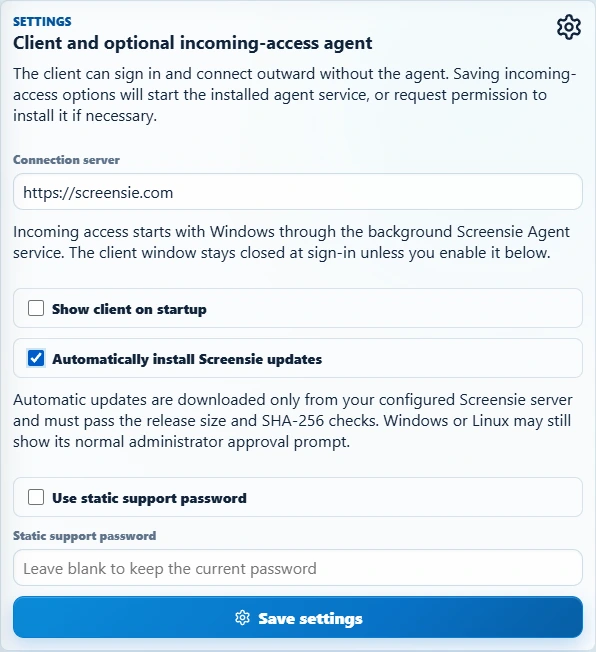
For repeat access: open the Client's Settings, select Use static support password, enter a strong Static support password, and select Save settings. You can also set it during Windows installation under Advanced options.
A private/static password is not the random password displayed for sharing. Do not put it in screenshots or public messages. Keep it in a password manager and use it only for authorized connections.
Confirm the PC is online and incoming access is enabled. It must remain powered on, connected, and have the required desktop permissions.
You do not have to sign every customer's PC into your own account just to connect by PCID and an authorized connection password.
Never install remote-access software or share access because an unexpected caller says your bank account or computer is in danger.
On your own computer, open Screensie Client to add the remote PC to your list.
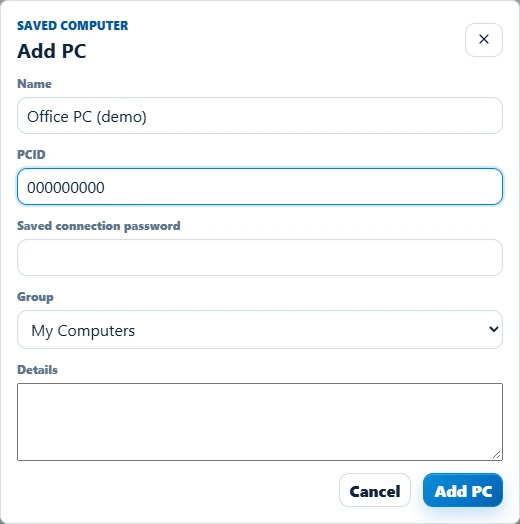
You can also skip saving: enter the remote PCID and password under Control remote PC for a direct connection.
A rotating password may change. Saving an old rotating password does not turn it into a permanent credential.
From Screensie Client on your own computer, choose Remote Control or Command Center for the saved PC.
Remote Control: open the saved PC to start a remote session, or use Connect with its PCID and password. Complete any access or operating-system permission prompts.
Command Center: open the saved computer's menu and choose Command Center. Start with Diagnose, then follow findings into tools such as Processes, Services, or the file browser. The remote installation must include Command Center and grant the requested access.
Check that the PC is online, the installed versions are current, and you entered that PC's connection password rather than your account password. On Wayland, approve sharing and input on the remote desktop first. See the Wayland setup walkthrough. A sleeping or locked-down PC is not the same as an available session.
For Command Center, check that its administration component was not excluded during installation. Contact support@screensie.com with the error and version numbers, never passwords.
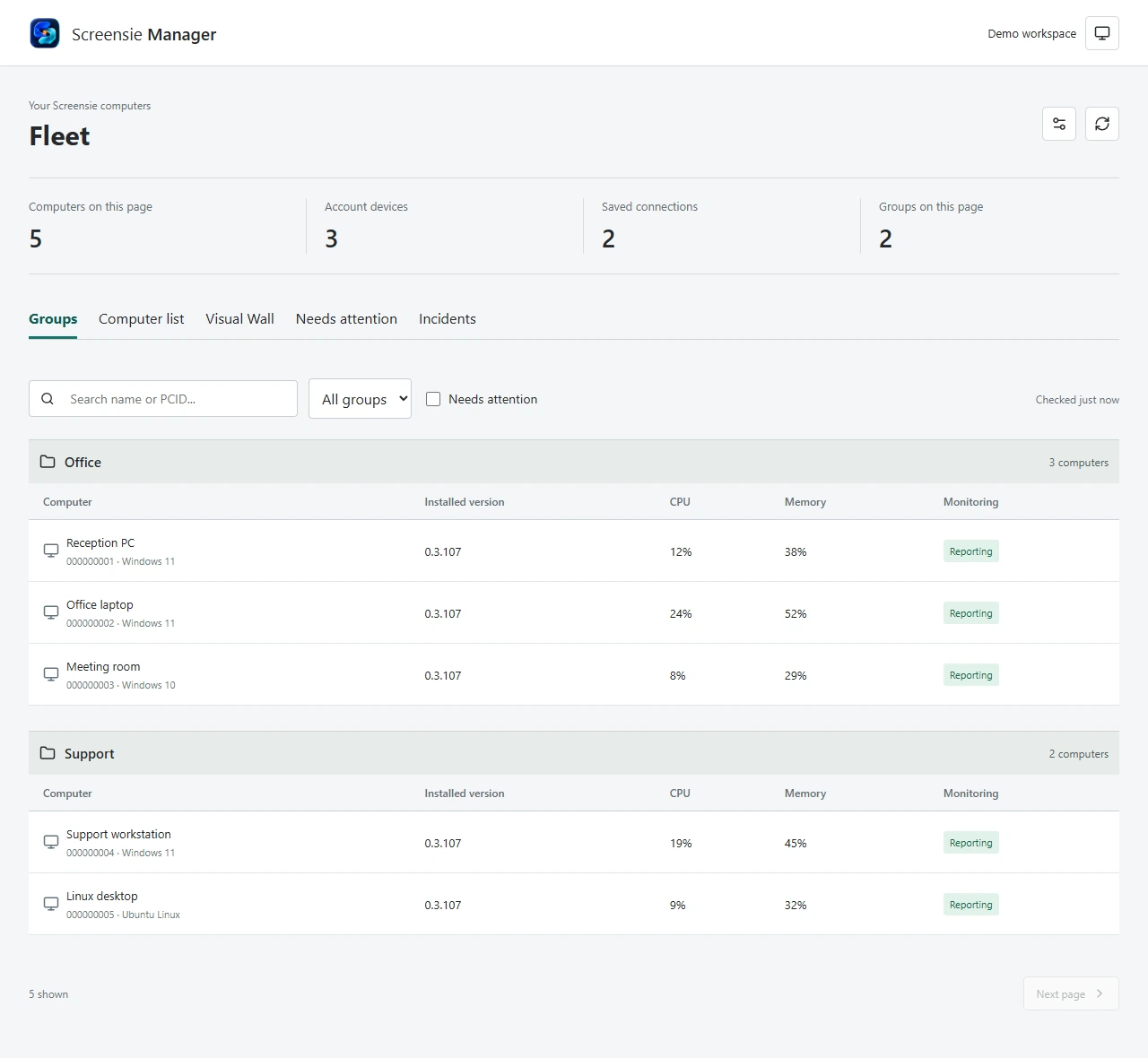
Use Manager on your management computer. Every active subscription includes access automatically.
A PC marked as awaiting a report has not yet supplied current monitoring data. Check its online state and installed version instead of assuming it is healthy.
Explore Manager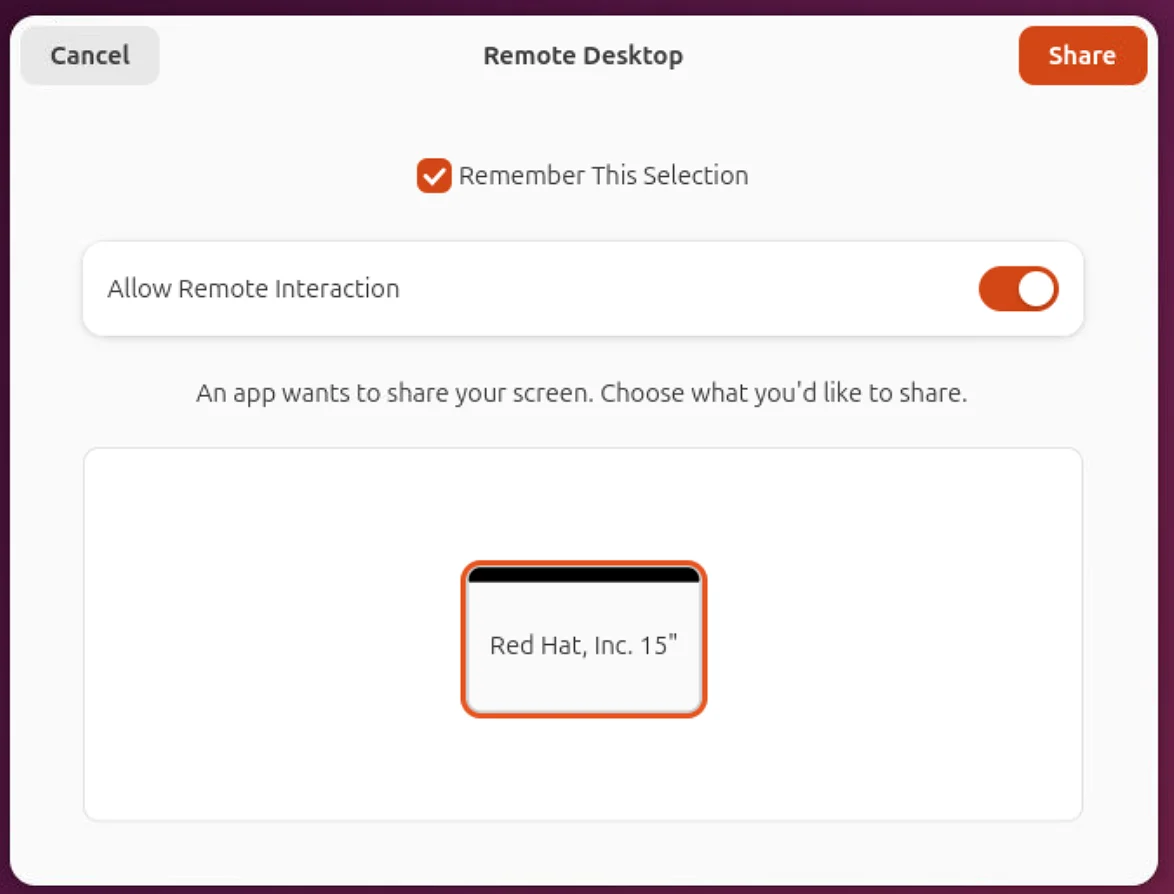
Approve screen sharing and input before leaving a Linux PC unattended. See the actual permission screen and test remembered access.
Open the walkthroughUnderstand your fleet. Review the work. Follow the results.
Start with the new Overview, then explore account-wide inventory with tables, cards, and a health grid. Review operations before submitting them and follow approvals, progress, and results in Jobs. Open remote support directly inside the installed Manager.
Timed screenshots are available on supported PCs. They are periodic snapshots, not a live video wall, and follow the host's permissions.
Every active Screensie subscription includes Manager automatically. No separate activation. No per-endpoint charge.
Open Manager or download its separate Windows or Linux app from your signed-in dashboard. Monitoring comes with the standard Screensie installation; the Manager dashboard app is only for the computers you manage from.
Encrypted connections, explicit access permissions, and controls on the remote computer.
Current supported clients protect screen, input, file, chat, and technician traffic through authenticated encrypted channels.
Use rotating passwords, private unattended-access credentials, or a temporary Quick Link. Share access only with someone you trust.
Supported hosts show the active session and provide local stop controls. Operating-system permissions, including Wayland sharing approval, still apply.
Questions about setup, billing, or a problem on a specific PC? support@screensie.com
Browse the support guidesRead what Screensie collects and how account deletion works before creating an account.
Privacy policyData deletionCancel future subscription renewal from your account dashboard. No support ticket or retention call required.
Read the billing termsEach subscription unit licenses two computers you connect from. No per-endpoint charge for the PCs you support.
Free
For the occasional helping hand.
Pro - Monthly Recommended
For technicians who want flexible billing. Your work PC and laptop, covered by one unit. No annual commitment.
Pro - Yearly Save $20 per unit
For technicians ready to pay yearly. The same two-PC coverage for $8.33/month equivalent, billed $100 yearly.
PayPal checkout. Cancel future renewal from your dashboard, with no support ticket or retention call. Billing and refund terms.
Two support PCs. Ten customer PCs or a thousand. Still $10/month.That is one monthly unit. Destination count does not change the price; outbound-device and simultaneous-session limits still apply.
| Plan | Price and billing | What to check |
|---|---|---|
| Screensie Pro - Monthly | $10/month. Two PCs you connect from. | Unlimited destination PCs. Cancel future renewal in your dashboard. |
| ScreenConnect One | $30/month equivalent, billed $360 annually. | One session and 10 unattended access agents. Other plans have different limits. |
| TeamViewer Remote | Annual subscription. Check the price for your selected plan. | Published terms specify annual renewal and at least 28 days' notice to cancel. |
USD, checked . Plans are not feature-equivalent; check each provider's current features, limits, taxes and terms. The provider names link to the source pages.
Every unit covers two support PCs. Your customers' computers do not add to this number.
Prices in USD. A trial does not automatically become a paid subscription. If you do not choose a paid plan, your account continues on Free.
One subscription unit licenses two outbound PCs. Paid plans include unlimited destination PCs, within outbound-device and simultaneous-session limits.
For help with your setup:
Contact supportOne monthly or yearly subscription unit licenses two outbound PCs. Both can make connections, including at the same time. Additional units add two more licenses each. Existing subscribers receive the same allowance without changing their billed quantity. Assign your outbound PCs on the Subscription page after signing in.
No. Paid seats are for the computers you connect from, not each computer you support. Paid plans let you save unlimited destination PCs without individual endpoint charges.
Independent technicians, computer repair shops, and small IT teams providing authorized support for Windows and Linux PCs. Screensie combines remote control, file transfer, diagnostics, and subscribed-account monitoring. Try the Free plan on your actual computers before subscribing.
If your requirement is a native macOS or mobile app, or guaranteed unattended access to a locked Wayland desktop, the Windows and Linux downloads offered here do not meet that requirement. Tools vary by operating system and permissions. Read the Wayland setup guide before relying on unattended Linux access.
Mobile apps, Mac access before login and guaranteed unattended access to a locked Wayland desktop are not included. Tools vary by operating system and permissions. Read the Mac setup guide or Wayland setup guide before relying on unattended access.
Install Screensie on the PC receiving support. Use the Screensie client or an available browser viewer to connect. Install the separate Manager app only on management computers, or open Manager from your signed-in dashboard.
No. Every active Screensie subscription includes Manager automatically. It uses the PCs and groups already in your account, and its download is available after you sign in.
You can configure unattended access on supported hosts. The desktop must be available and the required operating-system permissions must be granted. Wayland screen sharing may require local approval; Screensie does not bypass that permission. Use the Wayland setup walkthrough to approve the first connection and test remembered access.
Windows 7–11 and Linux packages are available. Features and permissions vary by system, desktop environment, and installed agent version. Try your actual computers with the Free plan before choosing a subscription.
Yes. Manage your subscriptions and cancel future renewal directly from your signed-in account dashboard.
Windows and Linux. Free to start.
Windows, Linux and macOS. Free to start.

Continue with